COM Port Watcher
A COM Port Conection and Disconnection watcher and monitor
I was working with some hardware that needed three or four COM ports attached at the same time. But they kept disconnecting and reconnecting as the devices on the end rebooted. So I needed to know which COM ports were connected at any one time.
Windows doesn't make this easy. You need to go into the device manager and find the PORTs then refresh it to see what ports are there. And sometimes the devices tree closes, making it a royal pain in the nuts.
So, I created COMWatcher. It's a little app that stays resident in the background, and puts an icon on the system tray.
When a new COM Port is detected, it pops up a notification balloon (and a small window for non-compliant systems), that shows whether the port was connected or disconnected. After 5 seconds, the window disappears.
You can also click the icon and bring up a window that shows the currently connected ports.
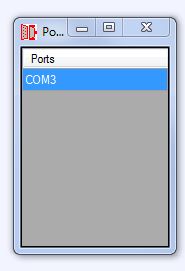 {.center}
If you double-click on one of the ports in the list, it'll open up a little port-listener window. You can connect to the port and it'll output all the stuff coming down it. It's just a listener, so you can't inject anything into the port (in this version).
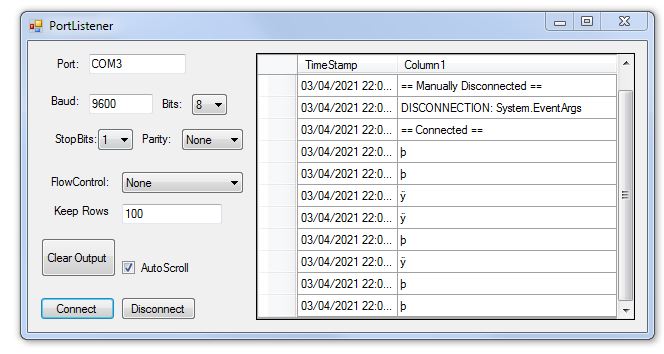 {.center}
If you close the windows, it'll just go back to a notification icon until you select "Exit" from the notification icon's pop-up menu.
This app is great for little Arduino projects with multiple COM ports. I can attach a secondary COM port to the TX/RX pins on the Arduino, and have this app watching the debug output, leaving the USB free for firmware downloads etc.
Instructions
- Download the ZIP file below
- Open the ZIP and copy the contents of the COMWatcher\bin\Release\COMWatcher.exe somewhere
- Open the COMWatcher.exe file
- Add/remove some com ports and see the popups.
- Open the window and double-click one of the com ports to connect to it
- Choose the right settings and click "Connect".
- Watch any messages coming through.
Get it here:
| Link | Description |
|---|---|
| FULL PROJECT Download | The Visual Studio 2019 project, full source code for you to giggle at. |
| Just The Application | Just the compiled Release binary |
- Note - COMWatcher has been extensively used by myself for about 4 years, but I didn't aggressively test it. It works fine if you add it into your startup menu, it'll just sit on the systray and notify you if a COM Port appears. If you muck about with ports while listening to them, I can't guarantee that the App won't crash. Let me know on Twitter if you find a bug.