TimesTables
During lockdown, we realised my daughter was struggling with her times tables. She needed a fast, easy way to practice addition, subtraction and multiplication.
Originally this was a little program that just ran through the 1x , 2x, and 5x tables, but after she ripped through those and managed to start aceing them, I added the rest of the times tables too.
Then, my son (who's a bit younger) wanted to practice his addition and subtraction, so I added addition, subtraction, and division too, which was great. However, I realised that what they really needed was something that would keep re-inserting the questions into the stream until they got it right.. So I added 'practice' mode, and they've managed to just about catch up with the national curriculum in super-fast time!
 {.center}
Instructions
- Download the ZIP file below
- Open the ZIP and copy the TimesTables.exe somewhere
- Open the TimesTables.exe file
- Choose the banks of numbers you want to work with.
- Choose the operations you want to work with.
- Click the 'practice', 'Quiz' or 'Challenge' buttons to try a different game mode.
 {.center}
Choosing banks of numbers
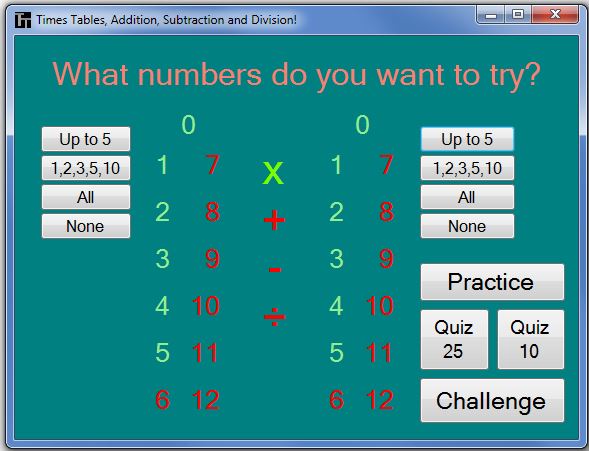
You'll see on the main page that there are two banks of numbers on the left and right. Clicking on the numbers will turn them red or green.
When they're green, they'll be used in the game. When they're red they'll be omitted.
The bank of numbers on the left are the main times-tables to go through. So if you wanted to practice some or all of your five times table, you'll turn all of the numbers on the left red and then just turn the 5 green. You can use the handy "Up to 5", "1,2,3,5,10", "All" and "None" buttons to choose from very common selections.
The numbers on the right are the ones you want to multiple, add, subtract or divide from the number on the left. So, if you wanted to practive the WHOLE of your 5x table you'd choose "5" on the left, and ALL of the numbers on the right. if you wanted to just practice the HARD parts of the 5x table, you'd maybe only choose" 6,7,8,9,11 and 12 on the right.
Choosing the operations
Between the two banks of numbers are four symbols for the four mathematical operators. When they're red they won't be included in the game. Clicking on them will turn them green, and they'll be included in the questions.
When you select more than one operator, both will be used in the game. So you can include a mix of addition and subtraction for KS1, while you can do some addition, subtraction and multiplication at KS2.
Game Modes
The game has four primary game modes:
- Practice
- Quiz
- Challenge
Practice Modes
Clicking the "Practice" button will start Practice mode. In this mode, the numbers selected on the left of the main page will each be used as 'levels'. So, for example, if you want to practive the 1,2,5 and 10 times tables, then Level 1 will be the 1x table, Level 2 will be the 2x table, Level 3 the 5x table and Level 4 the 10x table. Practice will end once you've finished all the levels.
During practice mode, you cannot 'lose'. If you get a question wrong, you'll be shown the right answer, but the question will be banked again, and it'll cycle back around for asking later. The order of the questions is randomized, and the order of the operators and operands is too. So, in the 1x table, you might get asked 1x3, 4x1, 6x1 then 1x2. Note that all four contain "1".
Quiz Mode
There are two quiz modes, 10 and 25. In these modes, 10 or 25 random questions are selected from all the possible options. So, for example if you choose 1,2,5 and 10 on the left on the main page, and 2,3,4 and 5 on the right, with addition and subtraction operators, that's 4x4x2 = 32 possible questions, from which a random 10 or 25 will be selected.
You have to get as many questions right as you can in the quiz.
Challenge Mode
Challenge Mode is the same as Practice Mode, in that each of the numbers selected on the left will form the levels of the challenge. However getting questions wrong will decrease your score. If you get lower than a certain threshold, the game will end at the end of the level. Given that higher numbers tend to be a little harder to work with, this generally means that the later levels will be a little harder, and it'll make a game that gets progressively trickier.
NO TIME LIMITS
The one thing in online times tables practice apps out there was that they enforce time limits. This, I found, was detrimental to the kids learning, because at the outset, they were still learning the keyboard, or the touch screen, and they were trying to think of the answer, and they were looking at the graphics, so the time was running out too quickly. So I deliberately did NOT put in time limits.