DBMTerm
The Serial Terminal Client with a scripting language
A few years ago some of the hardware engineers bungled something with one of our serial-driven devices. We only caught it after several thousand had been shipped to a customer. Faced with a massively upset customer, the higher-ups agreed to take back the stock, fix the issue, and send if back free of charge. The only problem: Fixing the issue took about an hour per device. 2000 hours is about 250 man-days, or around 30k of salary to do. So the MD demanded that we come up with a way to un-do their screw-up in the attempted rectification of someone else's screw-up.
I wrote DBMTerm in my spare time, a serial terminal which has an inbuilt scripting language, and which understands X-Term. Loaded onto six laptops in parallel, and having made 6 serial patch cables it allowed 2 to 3 people to drive the upgrades 6x faster by automating all the steps of the upgrading. Best of all, by using some workarounds and changing the port speed, we managed to finish the 2000 upgrades in a little under 4 days, rather than 250.
To thank us, the managing director told us that he didn't like screw-ups and it counted for absolutely nothing that we'd saved the company a customer and about 40k in salary when they fired the entire support and technical staff, the a-holes. haha
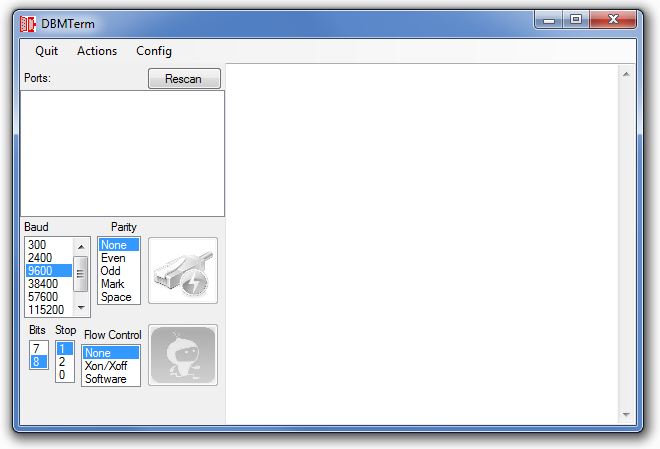 {.center}
If you don't want to use the scripting stuff, it works just like Hyperterminal or Putty. Just hit refresh, select the COM port, choose your settings, and connect.
If you want to do scripting, there's an inbuild script editor, and there's a help file with the syntax.
It's been incredibly useful when doing Arduino programming. I can use the script to periodically ping the 'duino, and pull out some info while I'm tinkering with the hardware.
Instructions
- Download the ZIP file below
- Open the ZIP and copy the contents of the DBMTerm\bin\Release folder somewhere
- Open the DBMTerm.exe file
- Choose a COM Port file.
- Choose a baud rate, handshake and other COM Port settings
- Click Connect
- Maybe try out making a script or two.
Get it here:
| Link | Description |
|---|---|
| FULL PROJECT Download | The Visual Studio 2019 project, full source code for you to giggle at. |
| Just The Application | Just the compiled Release binary, along with the help file |
| Help File | The help file which contains the scripting language syntax |
- Note - DBMTerm was tested in the fires of haste and panic to upgrade those 2000+ devices. It was also used repeatedly over the next year on upgrading dozens of other devices, downloading logs and all sorts of things. It's not a perfect piece of code, and if you relentlessly connect/disconnect from ports, it WILL get upset with you, and it MIGHT crash. However it's never done anything bad to anyone's machine.